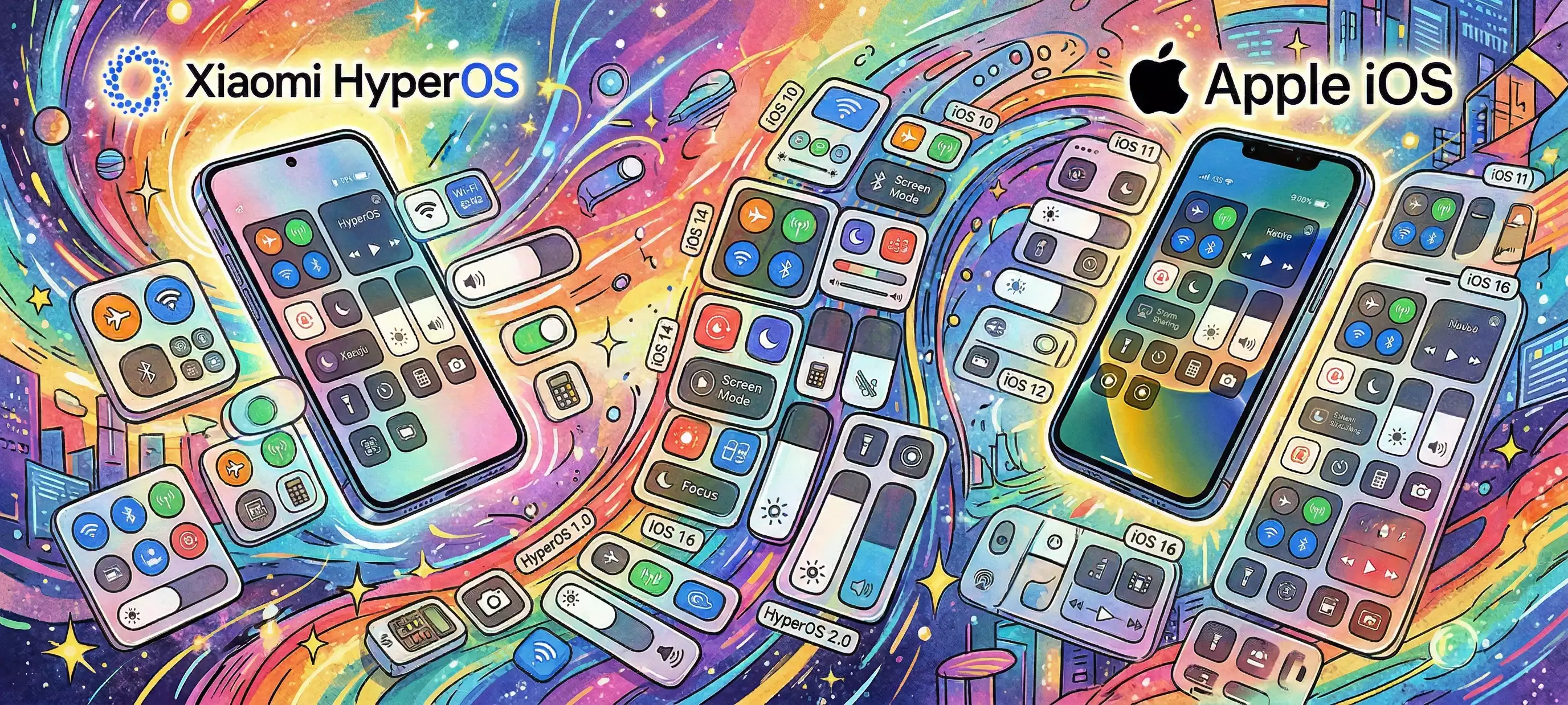
🌟 Control Center Master Index
TIP
本文由ChatGPT翻译,如果您的母语不是English,建议跳转至原文再进行自动翻译与查看。
This article is translated by ChatGPT. If your native language is not English, it is recommended to navigate to the original text and then use automatic translation for viewing.
Overview
The public base package comes from the overseas developer EGLife (@Naeemmulislam) [group link]
The full name of the base package is EGLife iOS 101, abbreviated as EG101 in this post; same below.
| Base version | Runtime environment | Replica target | Changelog |
|---|---|---|---|
| EG101 | MIUI & OS1⁽¹⁾ | iOS18, iOS17, iOS26 | Jump |
| EG105 | OS2 & | iOS18, iOS26 | Jump |
| EG260201 | OS3 | iOS18, iOS26 | Jump |
Detailed notes on runtime environment⁽ⁿ⁾
(1) EG101 system support status (tested):
| System version | Support | Notes |
|---|---|---|
| HyperOS1 | Perfect | - |
| MIUI14 | Perfect | - |
| MIUI13 | Usable | Tested installable after changing minSdkVersion to 31, but bugs may exist. |
| ≤ Android 11 | Not usable | Back then the Control Center was integrated into System UI rather than the plugin, so it won't show even if installed. For iOS-style Control Center on ≤ Android 11, use the theme-only method. |
(2) EG105 usability on OS3?
EG105 has added an OS3 branch. Since it is based on the OS2 base, Super Island will disappear after installation; all other basic Control Center functions work fine, and no more bugs have been found. If you don't mind, it can be used daily. Please do NOT install the OS3-adapted branch build on OS2.
Recommended to pair with this module, which can revert some information from Super Island back to Focus notifications (unofficial, may have minor bugs).
A new base package that supports Super Island is already being made by EGLife. Please wait patiently...
OS3 please use EG260201.
Download links
⚠ Warning
Before use, please be sure to read the #Instructions below.
Please strictly choose the correct version according to System Classification. Plugins between different systems are very likely not compatible. Installing the wrong one may hard-brick your UI! For recovery, see another article
If the link is invalid or there are other issues, send messages to Coolapk@Mr_Bocchi.
1. MIUI14 ~ HyperOS2
2. HyperOS3 Enhanced
Google DriveAvailable for a limited time.
Unzip password: b4834a1d75176ead48bcf1b7dcaea431
Instructions
Feature guide image
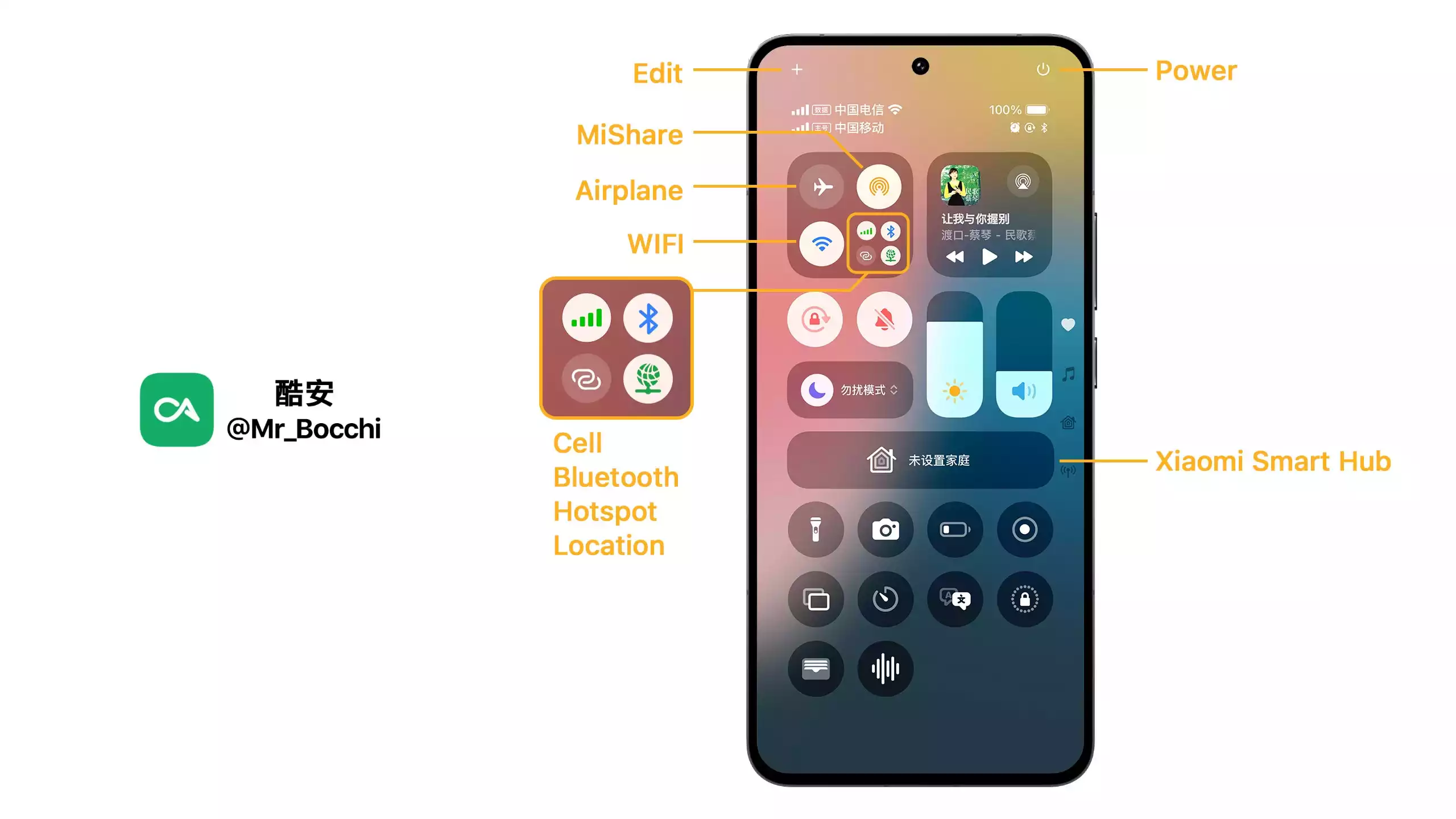
Material vs. Imitation Diff
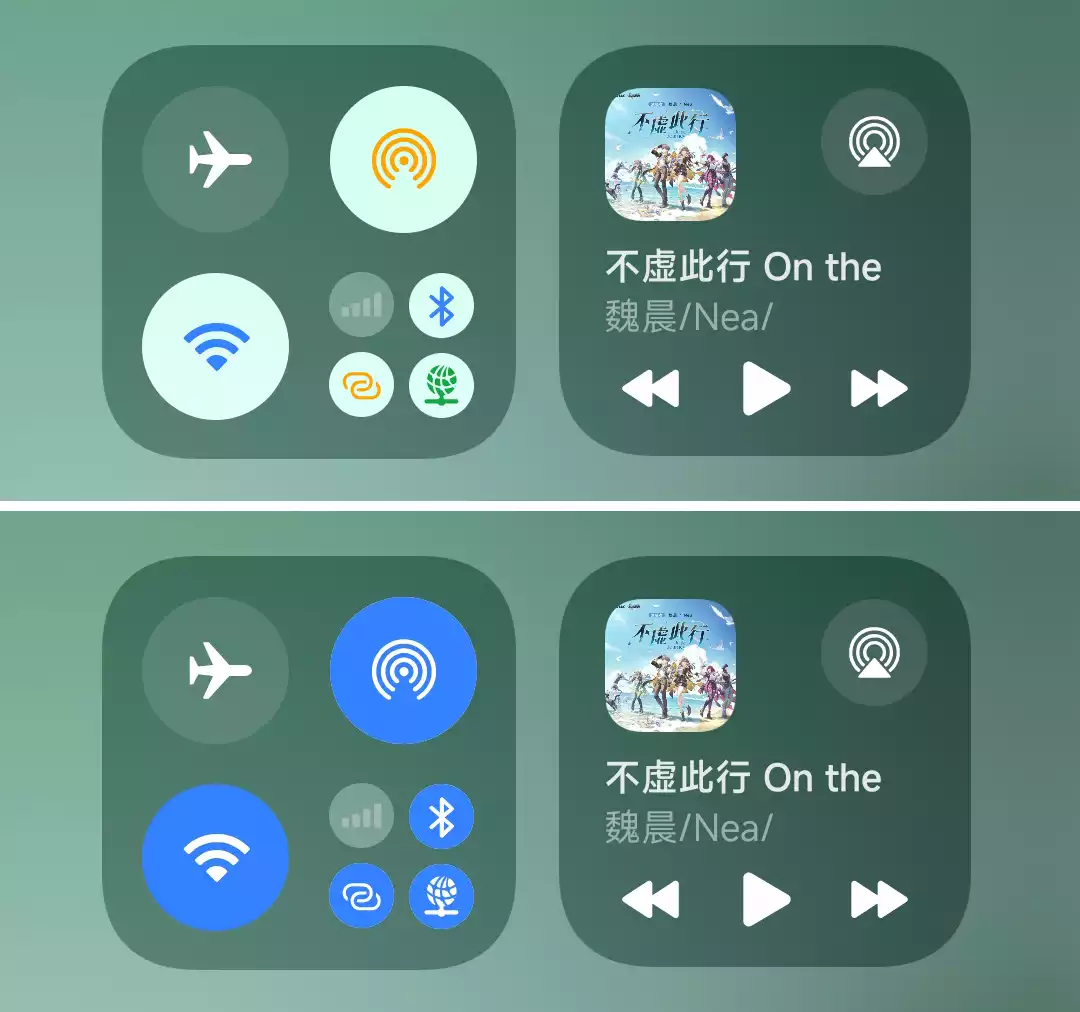
OS2 & 3 Edit Tiles
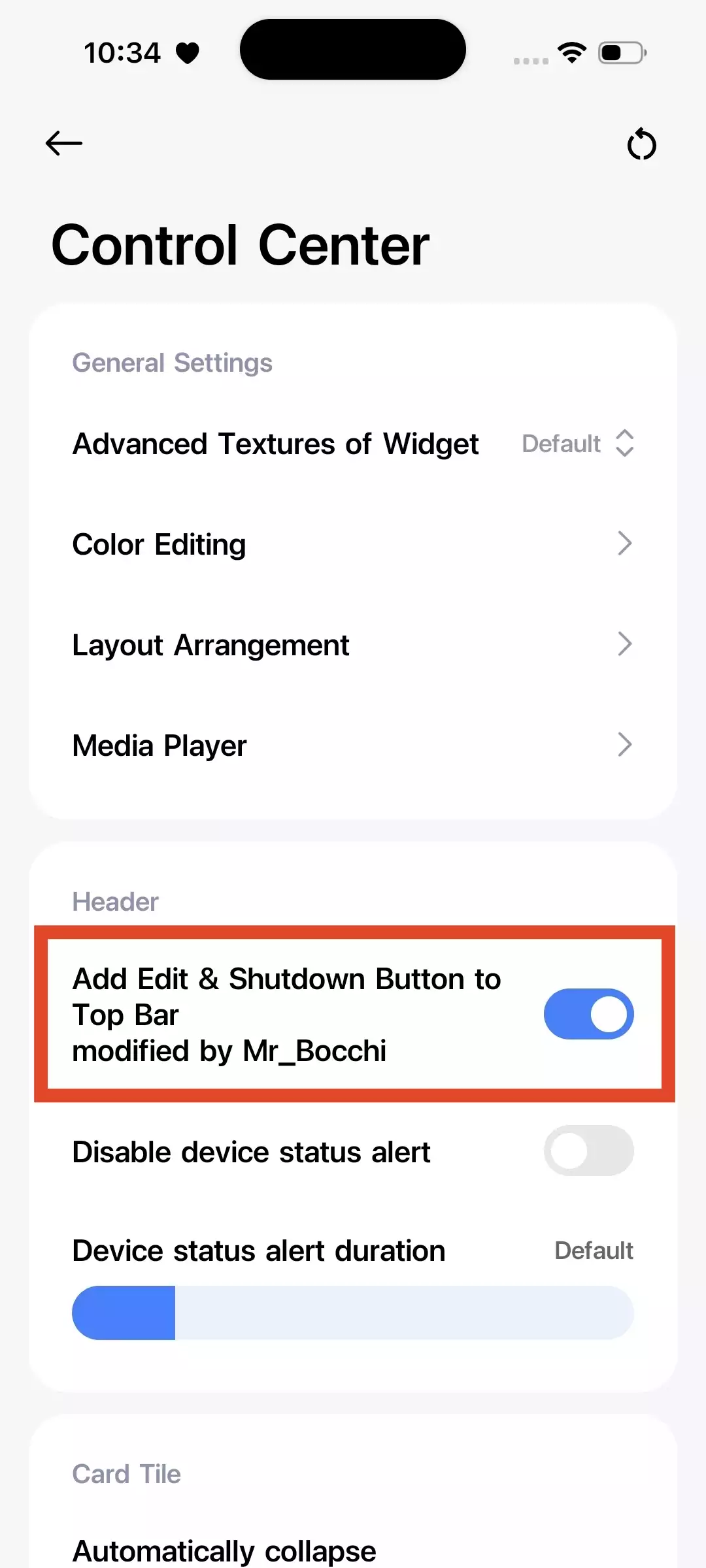
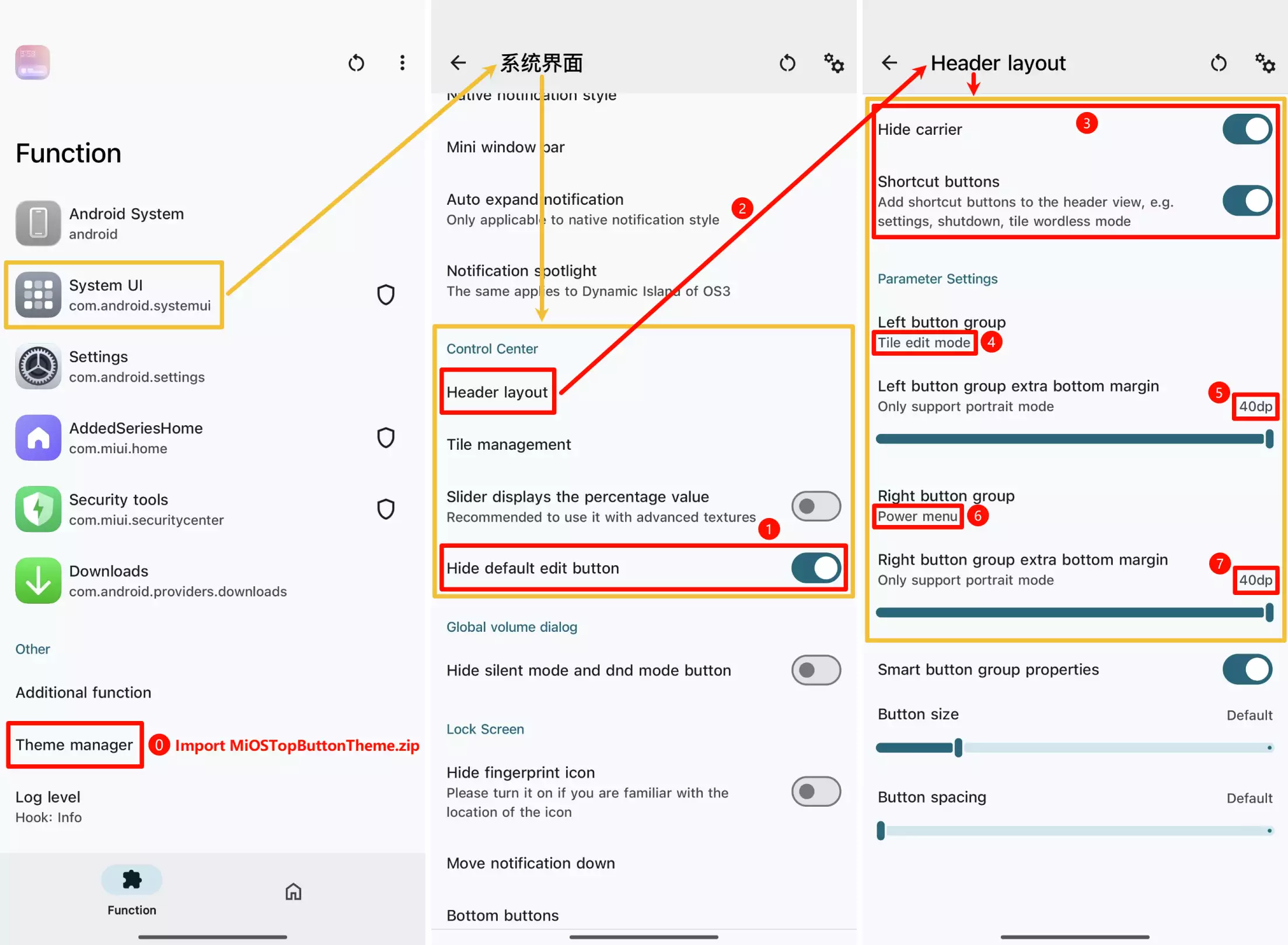
In OS2 and OS3, the real edit button at the top needs to be implemented using an LSPosed module.
OS2: Please install the[iOS Top Button] HyperStar.apkfile located in the same directory, enable the module, and turn on the following options.
OS3: Please install the corresponding version of the
OShapemodule, enable the module, and follow the steps below to set it up.
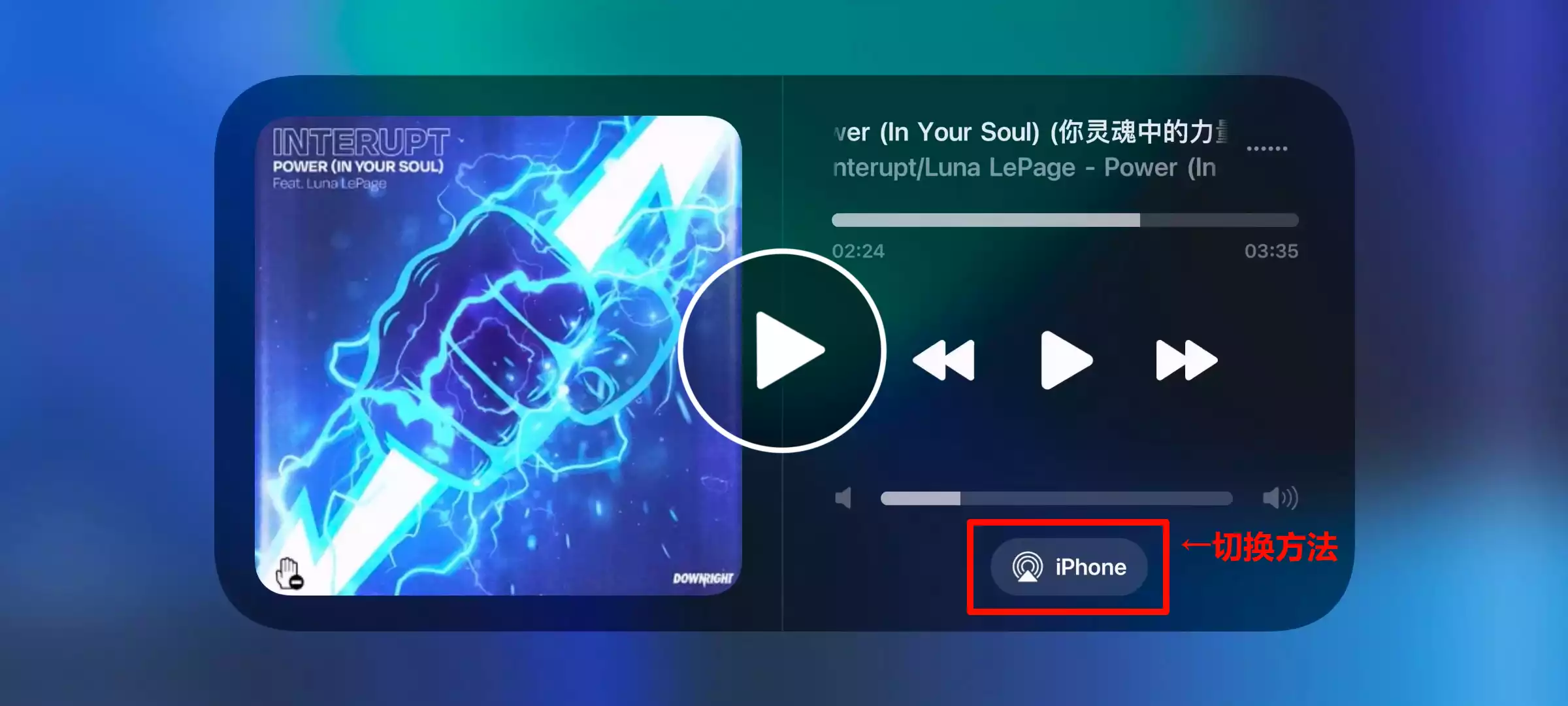
Switch play devices
Swipe up/down to switch. Same in portrait.
Icon Misalignment Issue
Encounter Wi-Fi/Bluetooth icons misaligned or turning into abnormal white or blue blocks?
The cause is the use of a third-party theme.
Use MT Manager to delete /data/system/theme/miui.systemui.plugin, then restart the system UI.
You need to delete it once every time after applying a theme.
Preview
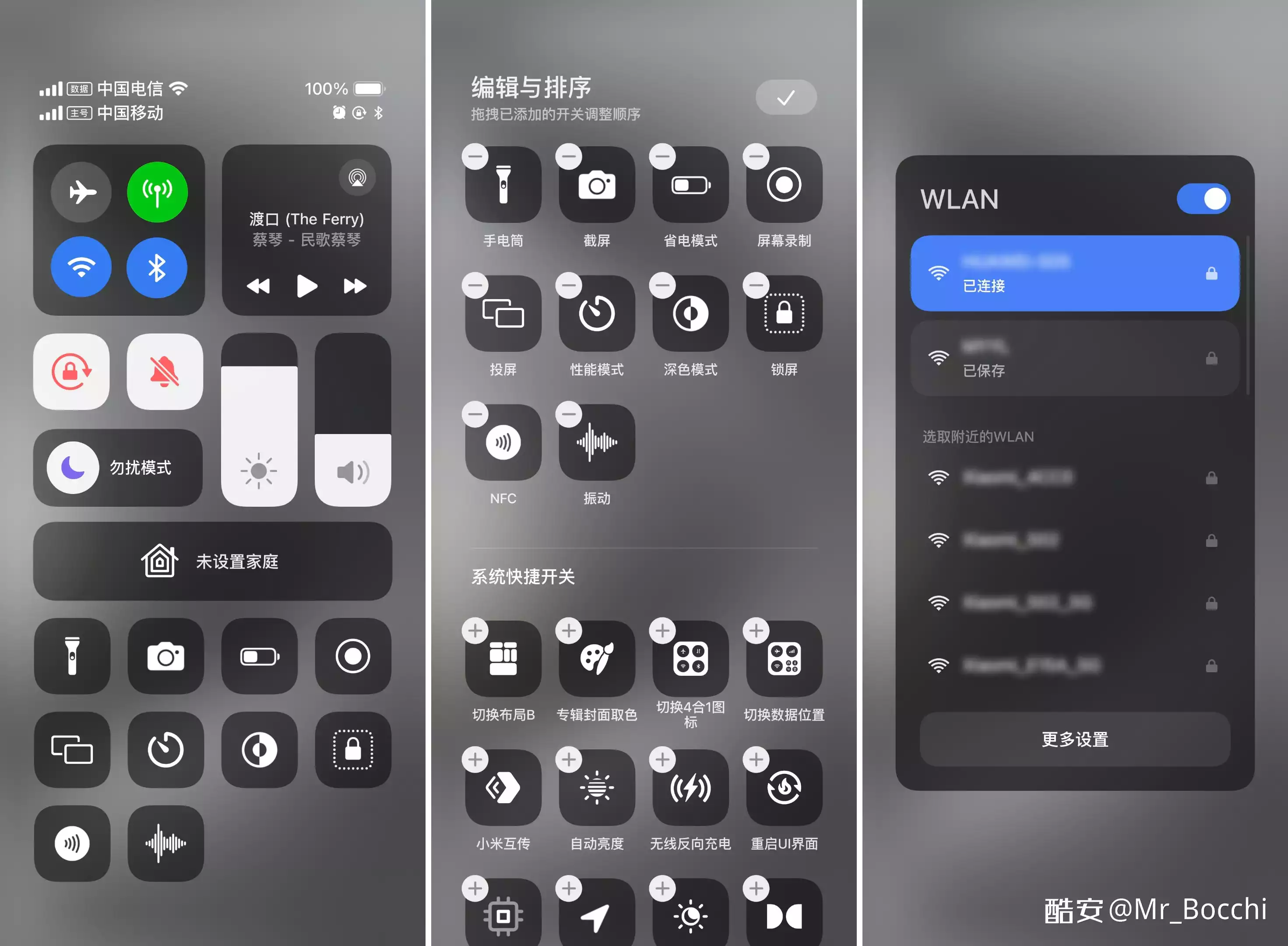
The plugin does not include the status bar. The images below are for visual reference only.
iOS17 (OS1)
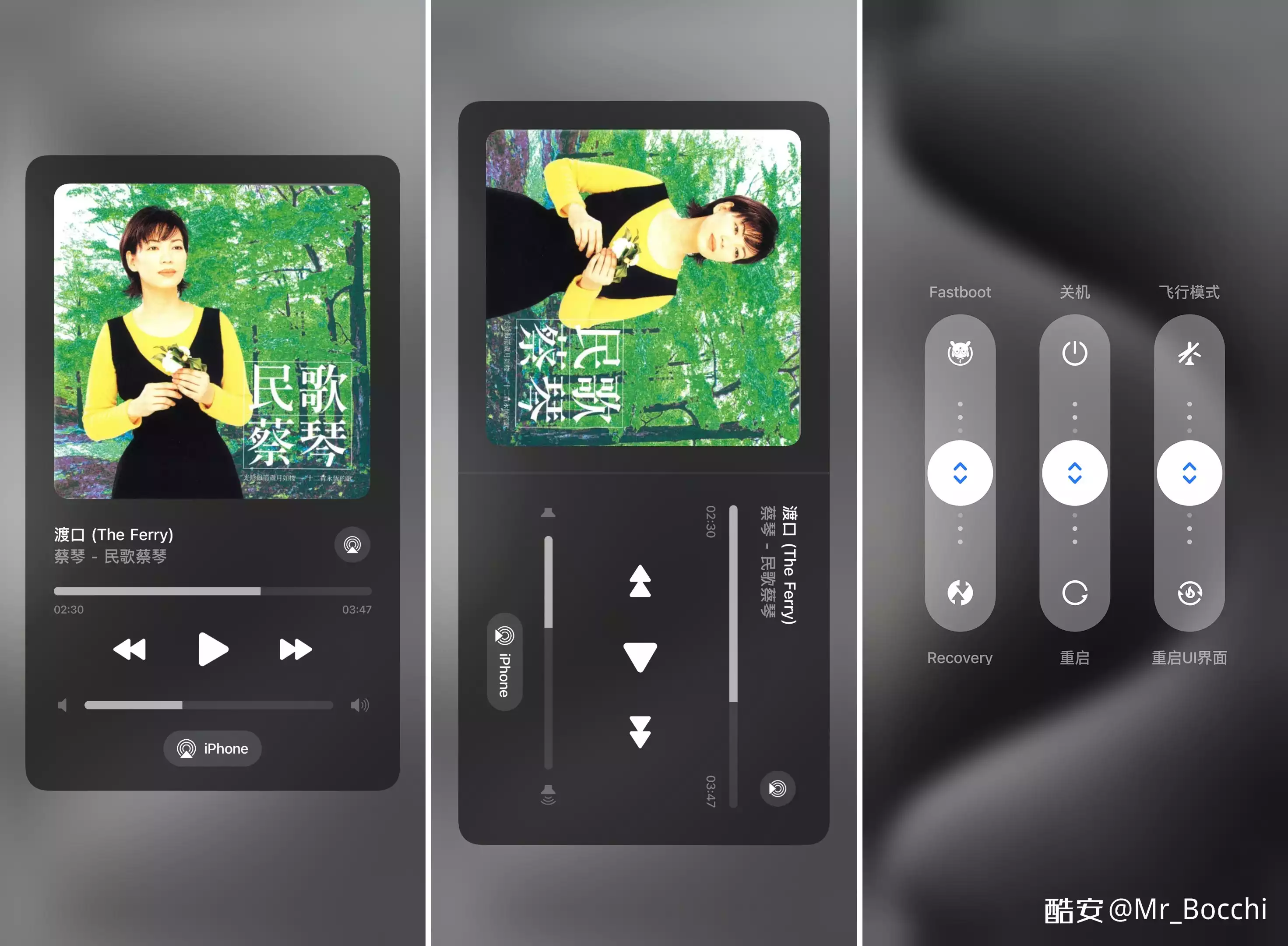
iOS18 (OS2)
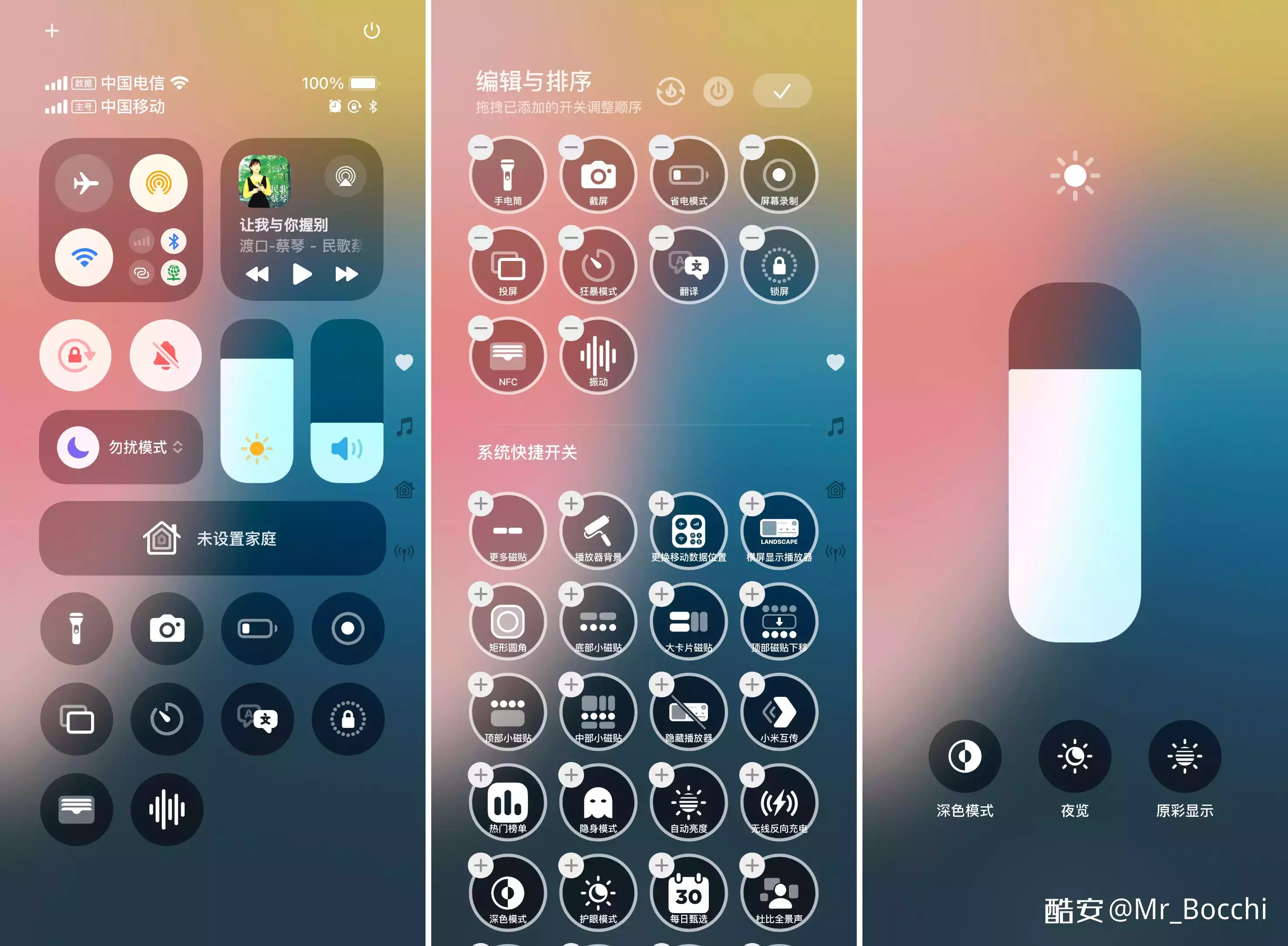
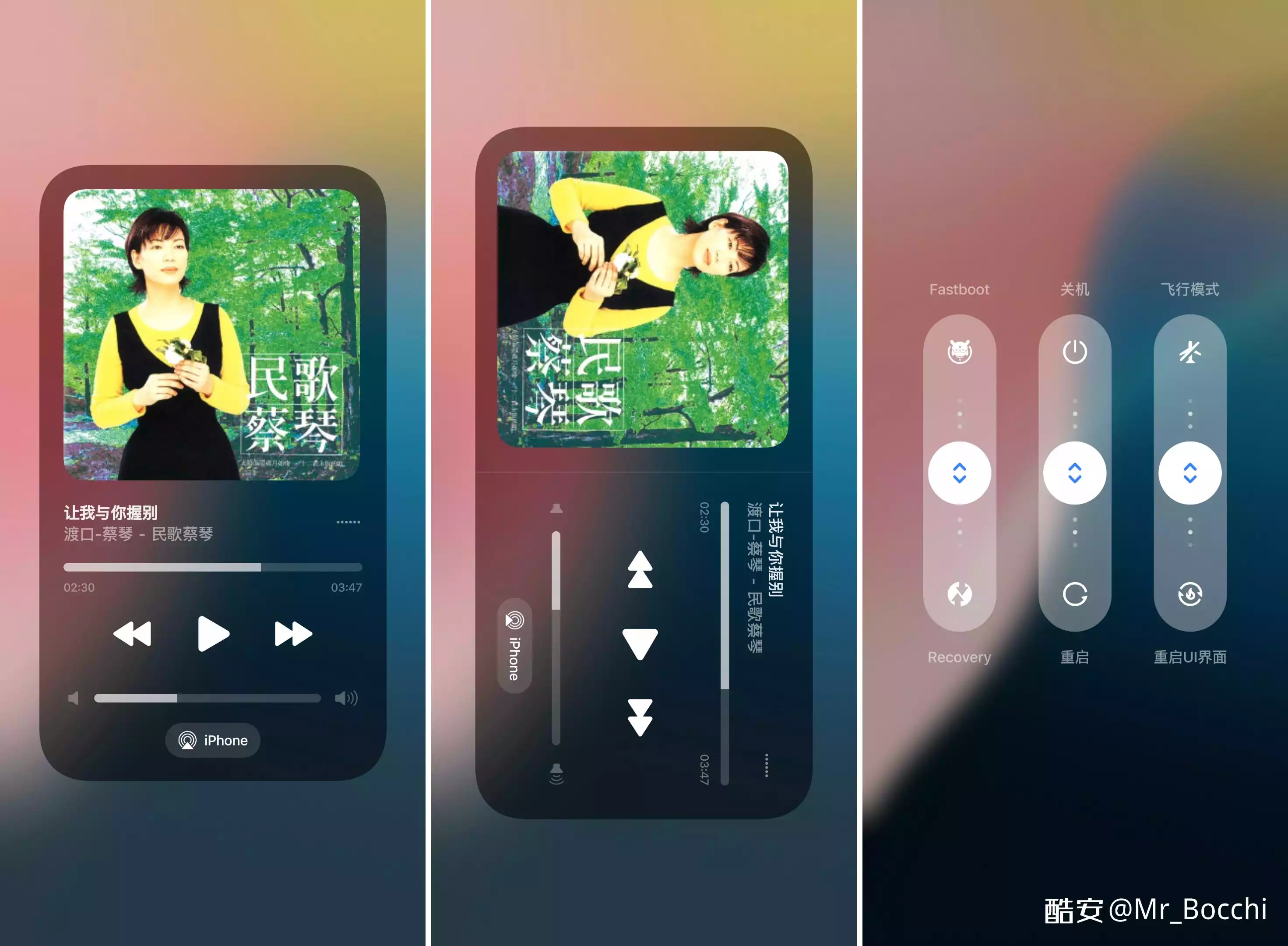
iOS26 (OS2)
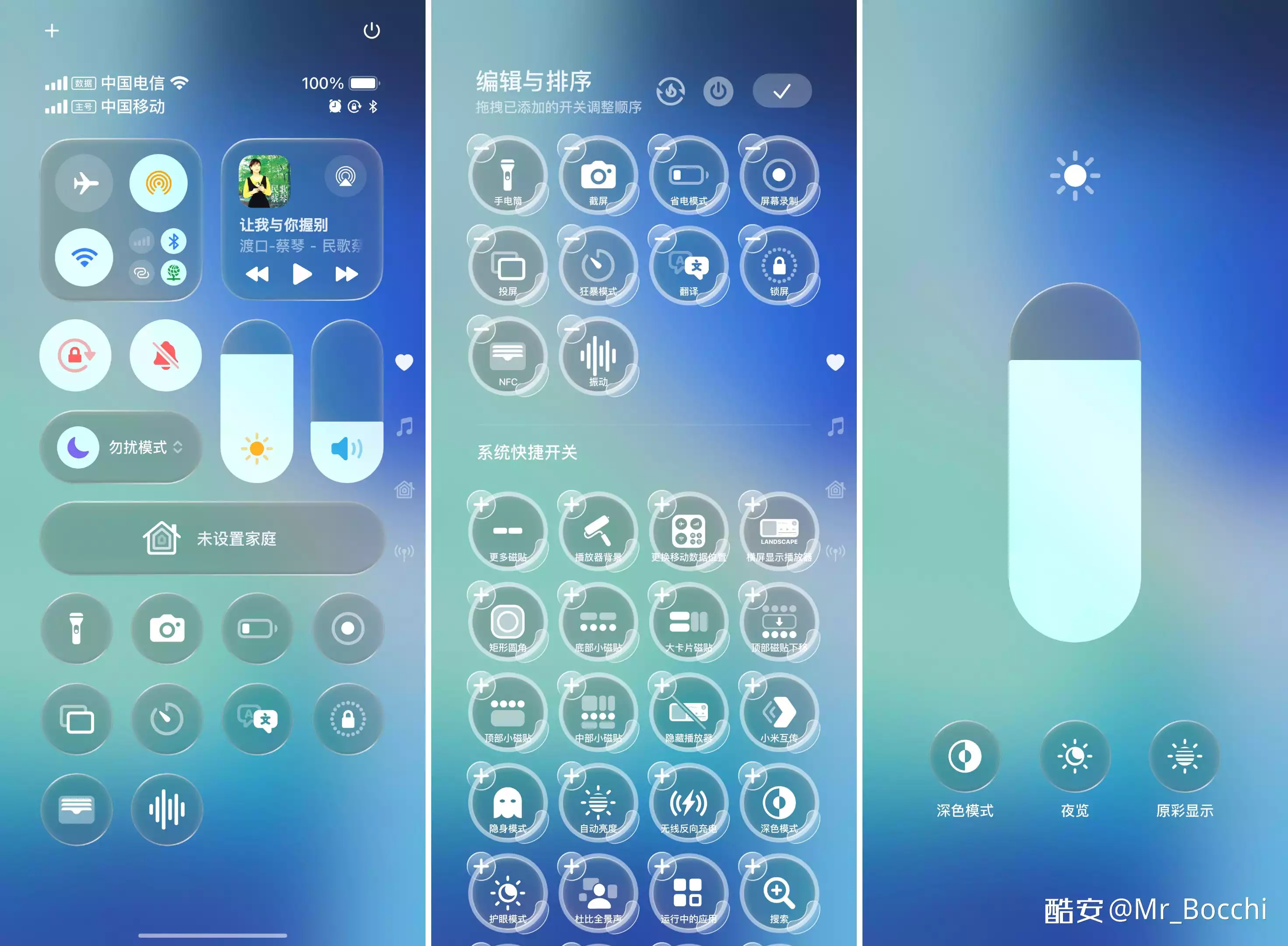
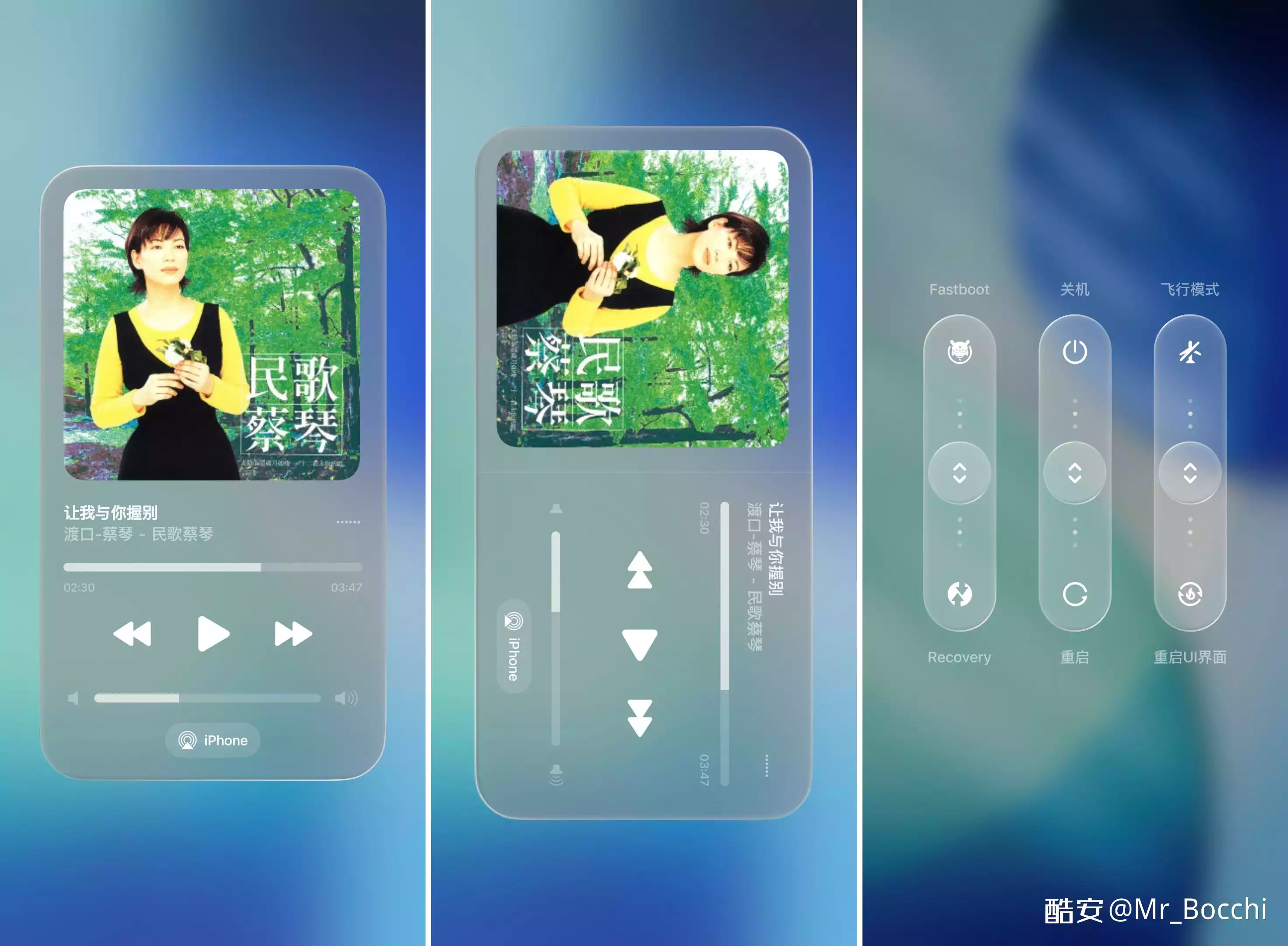
iOS26 (OS3)
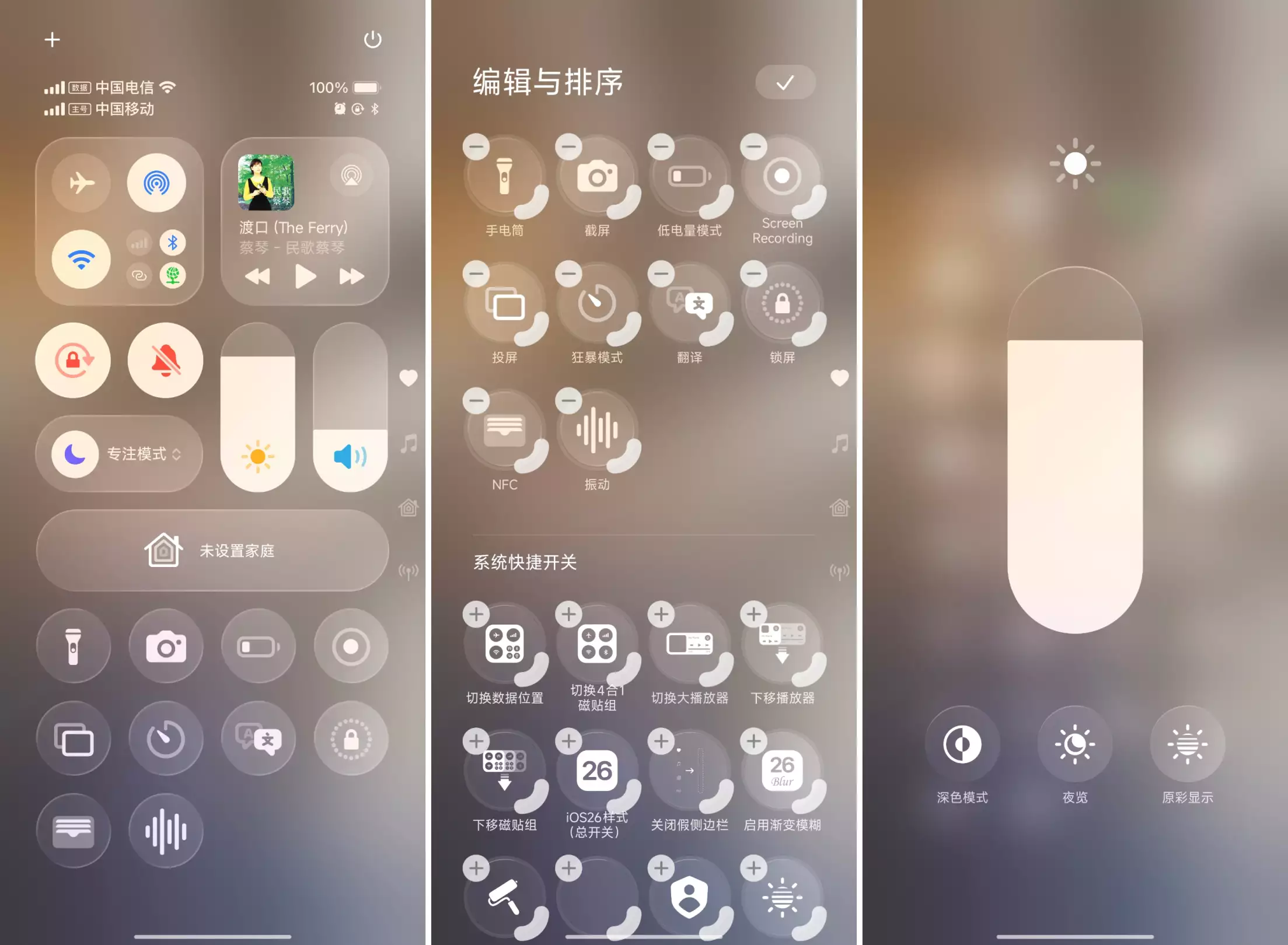
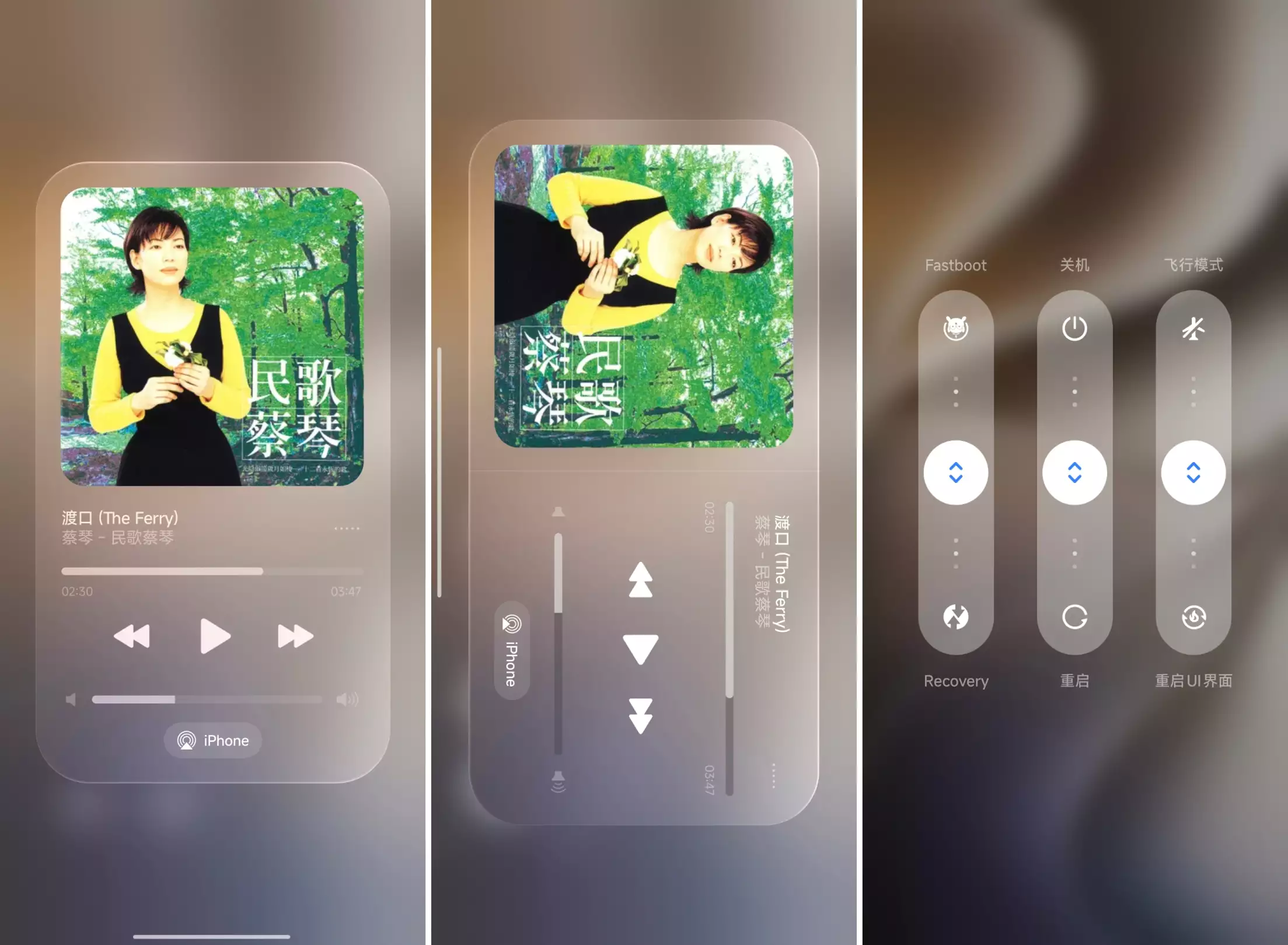
Layout preview
EG101 Layout
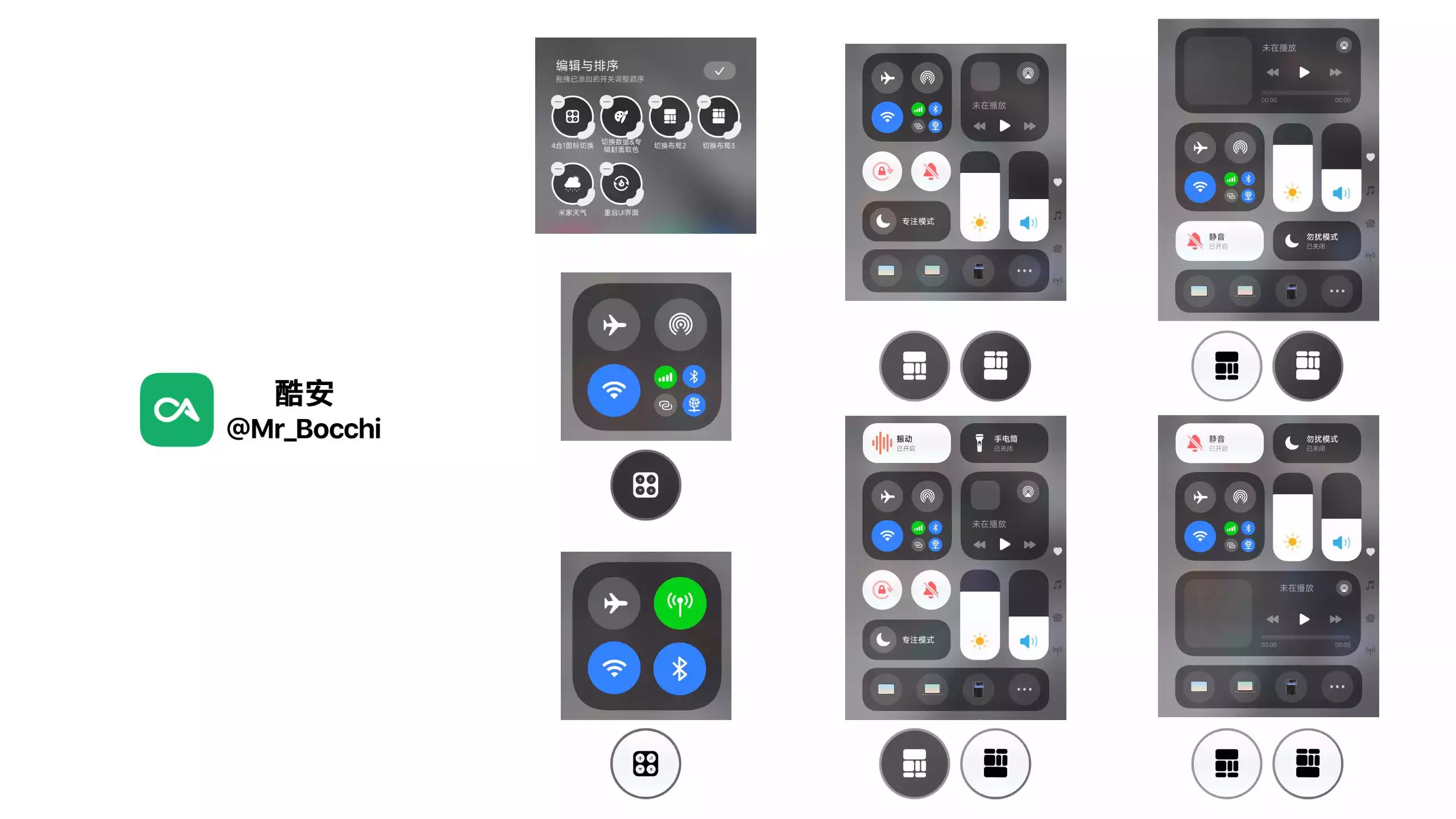
EG105 & EG260201 Layout
There are also a ton of these two layouts. I'm too lazy to make the graphics for now, so you guys can test them yourselves. I'll do it when I have time.
Full changelog
The logs are categorized by the base package.
For the actual supported system versions of each base package, please refer to the first table in the Overview section; details will not be repeated here.
Note: Click theDetailsbutton of each version to jump to the source / illustrated post.
Timeline Emoji legend
🚀: versions released by EGLife
🧪: versions modified & released by other devs
🛠️: versions modified & released by me (Coolapk @Mr_Bocchi)
✨: my latest version (recommended)
EG101
Note about a fixed bug
EG101 had a bug, and for a long time no fix was found.
Before use, you had to do the following, otherwise it would crash when Bluetooth is in restricted state:
• On OS1: go to Bluetooth settings and turn off "Always keep Bluetooth on".
• On MIUI: use the Cemiuiler module: "Home bottom → Others → Disable temporary Bluetooth off", enable it and reboot System UI; then install this plugin.
This bug has been fixed in the iOS Final Edition. The steps above are only needed for old versions.
• Added Chinese translations for some English text (editor button names).
• Fixed power-saving mode button color issues in some layouts.
• Redrew all icons for 3+4 big tiles
• Redrew brightness/volume slider icons
• Polished the first-level player UI
• Changed the top-left settings icon to a plus
• Added a fake scrollbar on the right
• Redrew the edit & reorder page
• Restored volume slider length and position
• Restored EGLife cover art for the first-level player in standard layouts (respecting the original author, so other EGLife covers were kept)
• Improved the second-level player
• Improved the advanced power menu
• Improved privacy indicators
• Improved the "mobile data unavailable" icon
• Optimized version code/name (to prevent modules from hooking it as an OS2 plugin)
• Fixed oversized "Scan" icon in the bundled theme
• More tweaks—try it yourself~
• Tweaked the fusion entry to a single-line layout to match the theme
• Tweaked fusion entry height to match small tiles
• Tweaked vertical position of device battery in fusion entry (e.g., headphones)
• Fixed the arsc de-obfuscation failure
• Fixed the extra Calculator small tile on MIUI after installation
• Fixed the extra misaligned small tile on Wi‑Fi tablets after installation
• Fixed the mobile data icon style when "Switch data position" is enabled
• Fixed V2V3 signature area: no need to enable "Always use installed app signature when installing" anymore
i.e., core patching no longer needs all 5 switches—only the basic 3
• Updated second-level player styling synced from EG105 (portrait/landscape/notification center)
• Updated the real edit button at the top (top-left was previously settings)
• Updated some common MiPlay device icons to AirPlay
• Separated "Switch data" and "Album color pick" features
• Redrew the change_style icon pack
• Tweaked the tile toggle banner style
• Redrew the DND tile style
• Restored default background blur strength
• First-level player text closer to iOS: no scrolling + right-side fade for overflow
• Built English content into the original package; auto switches with system language
Explanation: the English build used to be separate because some text is hard-coded; drawables can't switch by locale like strings, so resources had to be modified separately for i18n. Hard-coded example: the "Do Not Disturb" text is actually an SVG vector. This update packages both CN/EN resources into one APK and forces: if system language starts with zh, show CN vectors; otherwise show EN vectors.
• Added iOS17 and iOS26 appearance branches
• Plus other minor adjustments—enjoy~
• Since MIUI 14 cannot display the top edit button of OS1, the MIUI and OS1 versions have been separated, and the edit button in MIUI 14 has been reverted to the style of the last small tile before 2025-07-06.
• Optimized folder descriptions, starting with the Android version; and added the MIUI 13 version.
All changes in this update are directly merged into the original link, with no separate release.
特殊版本有使用限制,请知晓使用限制后使用。
【具体说明】
OS1原版无高级材质,此版本为所有白色按钮追加了高级材质(勿扰除外...解决不了)。
【使用限制】
• 不能关闭系统设置内的高级材质开关
• 不能使用除默认布局以外的其他布局(即未适配横向2x1的按钮)
总结就是我自己不使用的模式,就不适配到了哈哈。
该版本也直接合并入原链接,不作单独发布。
EG105
• Currently the strongest plugin: EG105 fixed build. Based on @モビウス's repaired extended features, with lots of detail/bug optimizations—try it yourself. Many styles.
2025-04-15
• Fixed layout offset after rotating 180°
2025-04-18
• Attempted to fix occasional "signal/network not clickable" bug
• Tweaked or redrew every icon style & color in the 4+3 tile groups
• Tweaked rotation & mute icon style & color
• Polished first-level mini player details
• Polished first-level large player details
• Polished second-level player (portrait) details
• Polished second-level player (landscape) details
• Polished second-level player (notification center) details
• Brightness second-level menu iOS-like (portrait & landscape)
• Restored volume slider length
• Set the last item of the advanced power menu to "Restart System UI"
• Partially localized the advanced power menu and adjusted background colors
• Tweaked overall Control Center padding (DensityConfigManager)
• Restored small button colors on the volume slider (often makes enabled state harder to see, and honestly not that pretty)
• Added iOS-like animated icons for brightness & volume sliders (spent a whole day figuring out how official animated icons work)
• Added fake notch & fake sidebars as decorations
Other minor changes
• Fixed DND large background color when advanced materials are off
• Fixed DND small background being too white when advanced materials are on
• Tweaked "Scan" small tile size
• Tweaked fusion device-center entry icon and name
• Tweaked localized descriptions for custom tiles
• Optimized APK file structure
• And more icon tweaks/redraws—enjoy.
Other TBD
• "Show-off edition" ✓
• Move edit button (or replace top-left with a real button) ×
• iOS-like edit page × After making it iOS-like, some tile name text becomes hard to see. I provided the approach in the linked post; use it if needed.
• Privacy notification × The OS1 approach no longer works; to change it now you'd have to modify System UI, so I skipped.
Released as two builds: "Material Edition" and "High-Replica Edition".
▍Material Edition keeps the original advanced material style for the "3+4 tile group" (by 老王). Looks better and suits daily use.
▍High-Replica Edition restores iOS18's original colors for users who want pure replication.
• Fixed brightness/volume sliders not tracking finger smoothly
• Improved volume second-level menu:
+ Added iOS-like icons (added slash animation)
+ Tweaked icon size and added two other iOS-like icons
• Because I increased the display size of brightness/volume icons in arsc, I forcibly reduced the material sizes of some other icons affected by that dimen, to offset the impact (just know I optimized a bit, ok
 )
) • Synced: ported lockscreen flashlight (link)
• Optimized version code/name (to prevent modules from hooking it as an OS2 plugin; preparing for OS3)
• Tweaked the fusion entry to a single-line layout to match the theme
• Tweaked fusion entry height to match small tiles
• Tweaked vertical position of device battery in fusion entry (e.g., headphones)
All tile backgrounds were redrawn. Previously I lazily re-edited 嗷嗷程's assets, but while embedding I realized I must strictly control each icon's width/height ratio and corner radius curvature, so I ended up drawing them myself
 . Compared to V1, this fixes adaptation for the first-level large player layout, second-level landscape player, icon edit page, etc. Small tiles in all custom layouts are still unusable—can't fix.
• Redrew the change_style icon pack.
EG doesn't draw icons. He used a low-quality png-to-xml tool, and the vector icon pack took a full 1MB. I redrew a set: looks better and takes less space
.• Some fixes and minor updates—won't list them all.
• Theme includes status bar icons.
By request, I'm embedding the status bar assets. Source: @嗷嗷程, with minor tweaks—special thanks.
The theme only includes basic Control Center assets. For full replication, go to third‑party themes by other creators.
• Updated second-level player menu; perfect support for playback device selection
• Updated: top dual buttons are now real buttons
(module-based; also removed the plugin's built-in edit icon)
• Updated some common MiPlay device icons to AirPlay
• Updated optimized edit page
• Fixed DND enable advanced material
• Fixed the white border forgotten in V2 for the iOS18 High-Replica build
• Fixed inconsistent disabled background colors for 3+4 in the iOS18 build
• Other minor optimizations & fixes
• Synced English build and made some improvements
Unless new bugs are found, or I get a really good new idea
。• Fixed: hide the scrollbar of the player device list in dark mode
• First-level player text closer to iOS: no scrolling + right-side fade for overflow
• Optimized all hard-coded text and fonts in DND & brightness second-level menus
• Optimized brightness second-level menu button order and theme icons
• Built English content into the original package; auto switches with system language
Explanation: the English build used to be separate because some text is hard-coded; drawables can't switch by locale like strings, so resources had to be modified separately for i18n. Hard-coded example: the "Do Not Disturb" text is actually an SVG vector. This update packages both CN/EN resources into one APK and forces: if system language starts with zh, show CN vectors; otherwise show EN vectors.
• Added an OS3-adapted branch
It solves the issue where EG105 on OS3 cannot open Wi‑Fi/Bluetooth second-level menus; but Super Island definitely can't be ported back.
EG260201
• EGLife Plugin by Naeemmulislam.apk
• EG Life v3.0.mtz
This version costs $1.
• Fixed secondary player crash when Advanced Materials is disabled
• Fixed background bug in the device list of the secondary player when Advanced Materials is disabled
• Fixed background color of bottom tiles in the brightness secondary menu when Advanced Materials is enabled
• Fixed issue where Control Center becomes smaller after system UI restarts during Xiaomi Screen Cast (Miaoxiang Desktop Casting) • Added simplified layout, keeping only the classic iOS layout
• Added top real button (implemented via Mod-OShape module)
• Added Chinese localization for custom tile names
• Added marquee title in secondary player (starts after 2 seconds)
• Added music playback status display in secondary player
• Redrew all custom feature icons (change_style_n)
• Updated some commonly used Xiaomi Miaobo device icons to AirPlay style • Optimized by replacing several large placeholder vector images
+ ic_miui_volume_headset & ic_media_device_default, etc.
• Optimized Advanced Power Menu: bottom-right option changed to Restart
• Optimized background color of Advanced Power Menu features
• Optimized Advanced Power Menu in custom features: now enabled by default, disabled after enabling the tile
+ Also updated the redrawn icons and names
• Optimized vertical position of the fake sidebar
• Optimized text, text position, and colors inside all 2×1 tiles
• Optimized and unified text size of all main interface elements (14dp)
+ Including player, 2×1 tiles, and Fusion Device Center
• Optimized external text and icons in Fusion Device Center
• Optimized Fusion Device Center to single-line layout
+ Prevents background stretching issues after enabling iOS26
• Optimized incomplete display of Fusion Device Center background (bg5png) in iOS26
• Restored device icon colors in Fusion Device Center
• Optimized layout details and bottom tile order in brightness secondary menu
• Optimized element background colors in brightness secondary menu when Advanced Materials is disabled
• Optimized primary player layout (12 media_player_view in total)
• Optimized secondary player (portrait) layout
• Optimized secondary player (landscape) layout (involves numerous detailed fixes)
• Optimized secondary player (Notification Center) layout • Adjusted signature settings section (for core patching, only the basic three options need to be enabled; no need to enable all five)
• Updated APK name & version & Credits.xml
There are many more detailed optimizations waiting for you to explore~ Known Issues
• Overflow issue of right-side elements when closing the secondary player in landscape mode (won’t be fixed)
+ Particularly noticeable when the primary player is positioned on the left in certain layouts
• Fixed battery icon display in default theme
• Optimized to adapt to tablet interface display
• Updated the OShape base package version to support LSP-API 101+
• Added an Imitation version branch (as shown here)
• Fixed the issue in the default layout where long-pressing Mobile Data fails to expand the secondary menu (Beta*)
*Details: The above issue was fixed, but there is still an unresolvable bug with the secondary menu's collapse and return animation. After fixing the long-press to allow expanding the secondary menu, the menu lost its collapse animation, causing the Control Center to get stuck in a semi-transparent state when closing. Additionally, I couldn't manage to make the secondary window return to the correct button. So, I opted for a compromise: I made the secondary window return to just any button (specifically, the first editable small button) to prevent the much uglier situation of the Control Center getting stuck in a semi-transparent state. Anyway, if I still can't fix this later on, this will basically be the final version in terms of the overall experience; my next step is to look into whether HyperLight's latest liquid glass can be adapted for this plugin.
Other high-quality builds based on EG base
EG104 (OS1 only)
Version notes
On HyperOS1, it's recommended to use EG101 directly. This build is not heavily optimized, and the details won't meet a "perfect" iOS-like standard.
Compared to EG101, this base adds advanced material effects for many tiles, adds several layouts, and makes inner button backgrounds in (3+4) transparent.
If you're interested in these features, you can try it; otherwise it's not recommended.
Also, EG101 has already fixed the Bluetooth crash and second-level player styling issues, so I won't touch this build. Maybe in the future, if fate allows.
Other versions
"Yijie" internal builds
TIP
Early builds that were more stable than the public builds; now kept only as notes, for nostalgia 📦.
Internal build: versions based on the paid base package from Coolapk @异界情人, then modified by me. Daily use was basically bug-free. But since the base is paid and not easy to redistribute, I only keep the corresponding file names so you can search them in the group files.
Public build: versions based on the base from EGLife on overseas social platforms, then modified by me.
Daily use may have small bugs, but it surpasses the internal builds in extended features. As for download links, I usually put them at the end of each Coolapk post—like/comment to get them.
| Runtime environment | Replica target | Codename | Best version file name | Coolapk |
|---|---|---|---|---|
| HyperOS2 | iOS18 | iOS18 Control Center team mod (updated) | OS2 iOS18 byM.B finished V3.APK | Jump |
| HyperOS | iOS18 | Yijie iOS18 mod UI #2 optimized | [iOS18 Supreme I] rework by @Mr_Bocchi.APK [iOS18 Supreme II] rework by @Mr_Bocchi.APK [iOS18 Supreme III] rework by @Mr_Bocchi.APK | Jump |
| HyperOS | iOS17 | iOS-like Control Center, Part 3 | • Daily: [4.3 Daily] Update2.5 rework by @Mr_Bocchi.APK • Daily (white): [5.10 Daily White] rework by @Mr_Bocchi.APK • Daily (Pad): [5.18 Pad] rework by @Mr_Bocchi.jpg (three variants: Wi‑Fi tablet vs cellular tablet) • High replica: [Ultimate High Replica 3.0] rework by @Mr_Bocchi.APK | Jump |
| MIUI | None | - | - | - |
The right-side links are only for showing the illustrated posts. For downloads, DM Coolapk @异界情人. After joining the group you can get them.
Theme-only version
| Runtime environment | Replica target | Author | Notes | Coolapk post |
|---|---|---|---|---|
| MIUI 12.x MIUI 13 (A11) | iOS17 | 懶貓雜貨鋪 | Theme method, fake buttons | Click to jump |
Provides a high-replica approach for MIUI 12-era Control Center.
May be paid; contact the author for details.